Best app to turn a photo into a coloring page: 8 options
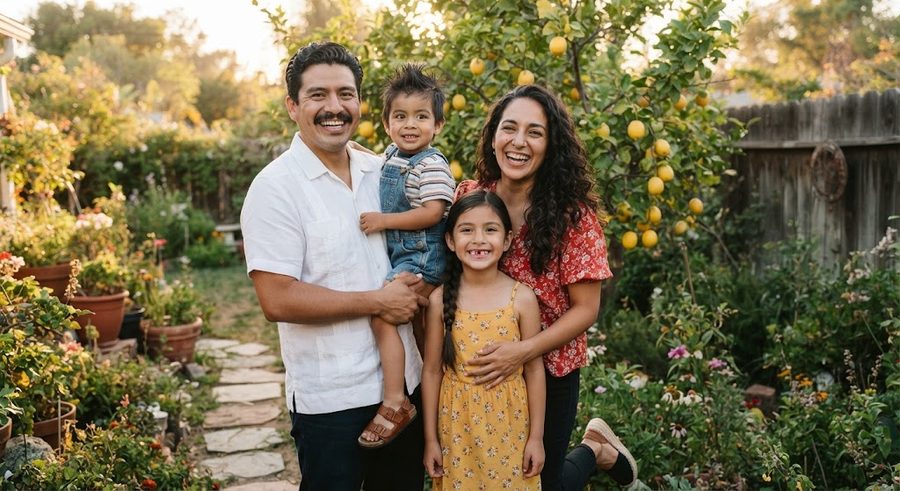
There is no single best app to turn a photo into a coloring page, because results depend heavily on the photo. For a free, kid-friendly first try, use Crayola's Custom Coloring Pages tool on its website. For more control over the style, try a web photo-to-sketch tool like Fotor or BeFunky. For a phone app that exports printable pages or books, look at Colorscape or Colorify, and check what the free tier allows. If you want the cleanest result and do not mind 20 minutes, trace the photo in a free drawing app.
I have not run a side-by-side lab test of these. What follows is what each maker's own page says the product does and costs, as read on October 25, 2026, plus what to watch for.
The quick comparison
| App or site | Platform | What it says it does | Cost, from its own page |
|---|---|---|---|
| Crayola Custom Coloring Pages | Web | Add your photo, edit, print a custom coloring page | No price shown on the page |
| Fotor Photo to Sketch | Web | 16+ AI sketch styles including line art and outline drawing | Free credits for new users and daily tasks |
| BeFunky Photo to Sketch | Web, mobile | AI sketch effects with adjustable strength | Some effects free, premium styles need BeFunky Plus |
| Colorscape: Photo to Coloring | iPhone, iPad | Photo to coloring outline, PDF coloring books, printed books | Free tier with watermarks, $6.99/month or $49.99/year |
| Colorify: Coloring Book Maker | iPhone, iPad | AI photo to sketch, simple or detailed styles, color by number | Requires a weekly, monthly or yearly subscription |
| Color Pop: AI Coloring Book | iPhone, iPad | Turns photos or text into line art to color in the app | Free download |
| Photo to Coloring Book | iPhone, iPad | Converts a photo to a black and white drawing to paint | Free with ads, premium removes them |
| ibis Paint X | iPhone, iPad, Android | Drawing app with layers, for tracing | Free download |
Free web tools
Crayola Custom Coloring Pages. Crayola's page invites you to "add your photo and create your own coloring page. Edit, print and color your own custom page." It is aimed at families, it runs in a browser, and it is the simplest place to start.
Fotor Photo to Sketch. Fotor says its converter offers 16+ sketch styles, including line art, outline drawing and clean line, and mentions coloring pages among its uses. Its FAQ says new users get free credits and more come from daily tasks, so heavy use moves you toward a paid plan. For coloring pages, the outline and clean line styles are the ones to try; pencil sketch styles keep shading that is hard to color over.
BeFunky Photo to Sketch. BeFunky describes AI sketch effects where you can adjust how closely the sketch follows the original photo, and says some effects can be tried without an account while premium styles need a BeFunky Plus subscription.
Phone apps built for coloring pages
Colorscape: Photo to Coloring. Its App Store listing describes photo to coloring outline conversion, PDF export for printing and print-on-demand coloring books. The listing's free tier allows 3 watermarked coloring pages a week and PDF books of up to 5 designs; the Creator subscription is listed at $6.99 a month or $49.99 a year, and single watermark-free exports at $0.99 a page.
Colorify: Coloring Book Maker. The listing promises AI photo-to-sketch conversion with simple, detailed or pixel art styles, plus color-by-number pages, and says you must subscribe weekly, monthly or yearly to use the app. No prices were shown in the listing text.
Color Pop: AI Coloring Book. Mainly a coloring app you use on screen. Its listing says it can turn any photo into a coloring page as well as generate pages from a text description. Good if your child colors on a tablet, less useful if you want paper.
Photo to Coloring Book. A simpler app whose listing says it converts your photo to a black and white drawing for painting with its tools, with a premium version that removes ads and adds colors.
The free option that often beats them: tracing
A drawing app with layers, such as ibis Paint X, is not a converter, but it gives the cleanest pages. You put the photo on one layer, lower its opacity, and trace the outlines that matter on a layer above. The free photo-to-coloring-page guide walks through that method step by step, along with free GIMP and Photopea filters. If you work in Canva, the Canva guide covers what it can and cannot do.
Why AI converters give such mixed results
Automatic converters, AI or not, find edges and shading in a photo and turn them into lines. That works on a clear, simple picture and goes wrong on the things families care about most:
- Faces. A few stray lines can change who a child looks like. Small faces in a big photo often turn into smudges.
- Dark hair and clothing. These become solid black areas with nothing to color.
- Busy backgrounds. A living room becomes hundreds of tiny shapes.
- Too much detail for a toddler. A two-year-old needs big spaces. The guide on when toddlers start coloring covers matching detail to age.
So try two or three apps with the same photo, pick the best result, and plan to erase or redraw a few lines. A sharp, well-lit photo with a plain background and a face that fills the frame improves every app's output.
Before you upload photos of your kids
Read the privacy policy first. Look for whether photos are stored, whether they are used to train models, and how to delete them. If you would rather not upload at all, tracing keeps the photo on your own device.
For a whole book rather than single pages, Colorkin is one more option: pages drafted with AI illustration tools from your photos, then checked and finished by a person for likeness. Free methods are under make your own.
Questions parents ask
What is the best free app to turn a photo into a coloring page?
For a quick free try, Crayola's Custom Coloring Pages tool on its website lets you add a photo and print a page. Fotor and BeFunky have free photo-to-sketch effects on the web. For the cleanest free result, trace the photo in a free drawing app like ibis Paint X.
Do AI photo-to-coloring-page apps work well?
They vary a lot from photo to photo. Faces are the hard part: a converter can lose a likeness, add odd lines or leave dark patches. Try a few photos, expect to clean some up, and check the free tier before you subscribe.
Are photo-to-coloring apps safe for photos of my kids?
Read the privacy policy before uploading. Look for what happens to your photos, whether they are used to train models, and how to delete them. If you are not comfortable, tracing on your own device keeps the photo private.
Can I print the pages from these apps?
Most let you download an image or PDF to print. Some free tiers add a watermark or limit resolution, so check what the free version exports before you plan a whole book around it.
See your own family on a page, free
Tried an app and the face came out wrong? Send one photo and we will email you a free sample coloring page of your child, checked by a person. No card needed.
Get a free sample pageMore in Make your own
Turn your child's drawing into a coloring page or a book
Turn a child's drawing into a coloring page: scan it, push it to pure black and white with Threshold, thicken lines, then print or bind a book.

Turn a photo into a coloring page for free: 4 methods that work
Four free ways to turn a photo into a coloring page: GIMP filters, the Photopea browser editor, tracing on a tablet or window, and a free drawing app.
How to write a short story starring your child
A simple 12-page template for writing a picture-book story with your child as the hero, plus tips on plot, length, pictures and reading it together.